Make Valorant TikToks that keep the kill feed
Make a 9:16 reel that keeps the kill feed and the minimap. Use the Blur layout, or put each area where you want it.
A TikTok, a YouTube Short and an Instagram Reel are 9:16. A Valorant video is 16:9. If you cut the center of the picture, the kill feed and the minimap are not in the reel. This guide shows two procedures that keep them.
| Procedure | Result | Plan |
|---|---|---|
| Step 1: the Blur layout | All the picture, with the kill feed and the minimap, on a blurred background. | Free on all plans |
| Step 2: a custom reel | The game, with the kill feed and the minimap where you put them. | Part of a plan. A new account can use it free for 7 days. |
Before you start
Make sure that you have these items:
- A Valorant clip on the Clips screen. To make clips, see Turn old Valorant recordings into highlight clips.
- The clip is open in the Editor. See Edit a clip and make a 9:16 reel, step 1.
1. Keep all the picture with the Blur layout
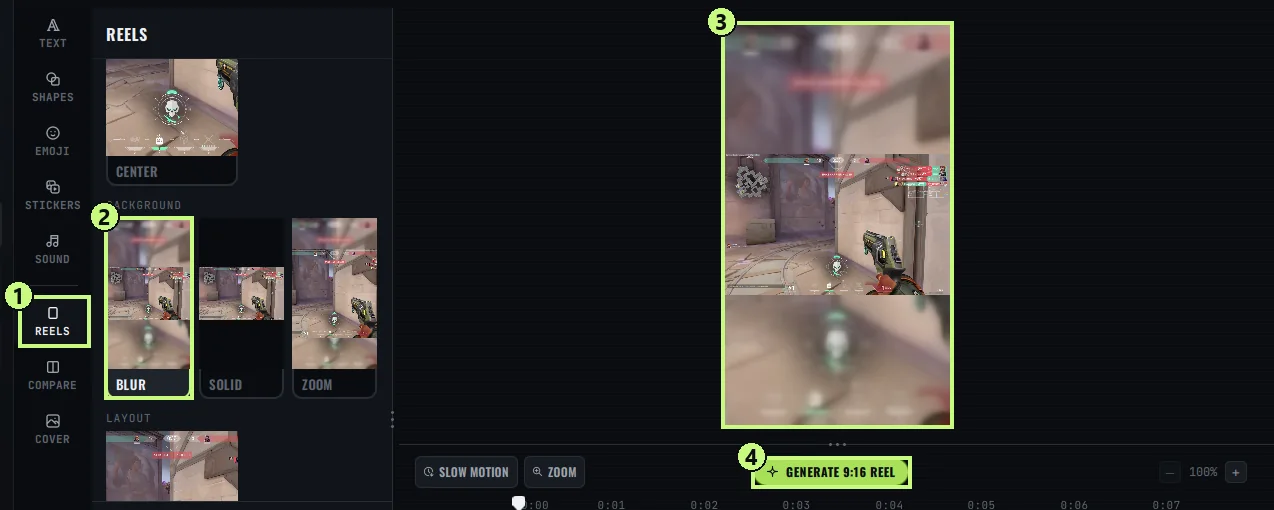
- Click REELS (1).
- Under BACKGROUND, click Blur (2). If you cannot see it, scroll down the panel. The preview (3) shows all the picture on a blurred copy of the picture.
- Make sure that the kill feed and the minimap are in the preview.
- Click GENERATE 9:16 REEL (4).
GLworm makes the reel as a new clip. The original clip does not change. GLworm does not put a watermark on the reel.
2. Put the kill feed and the minimap where you want them
NOTE: CUSTOM REEL is part of a plan. A new account can use it free for 7 days. See Pricing.
In a custom reel, each box is an area of the recording, for example the kill feed. You put each box where you want it in the 9:16 picture.
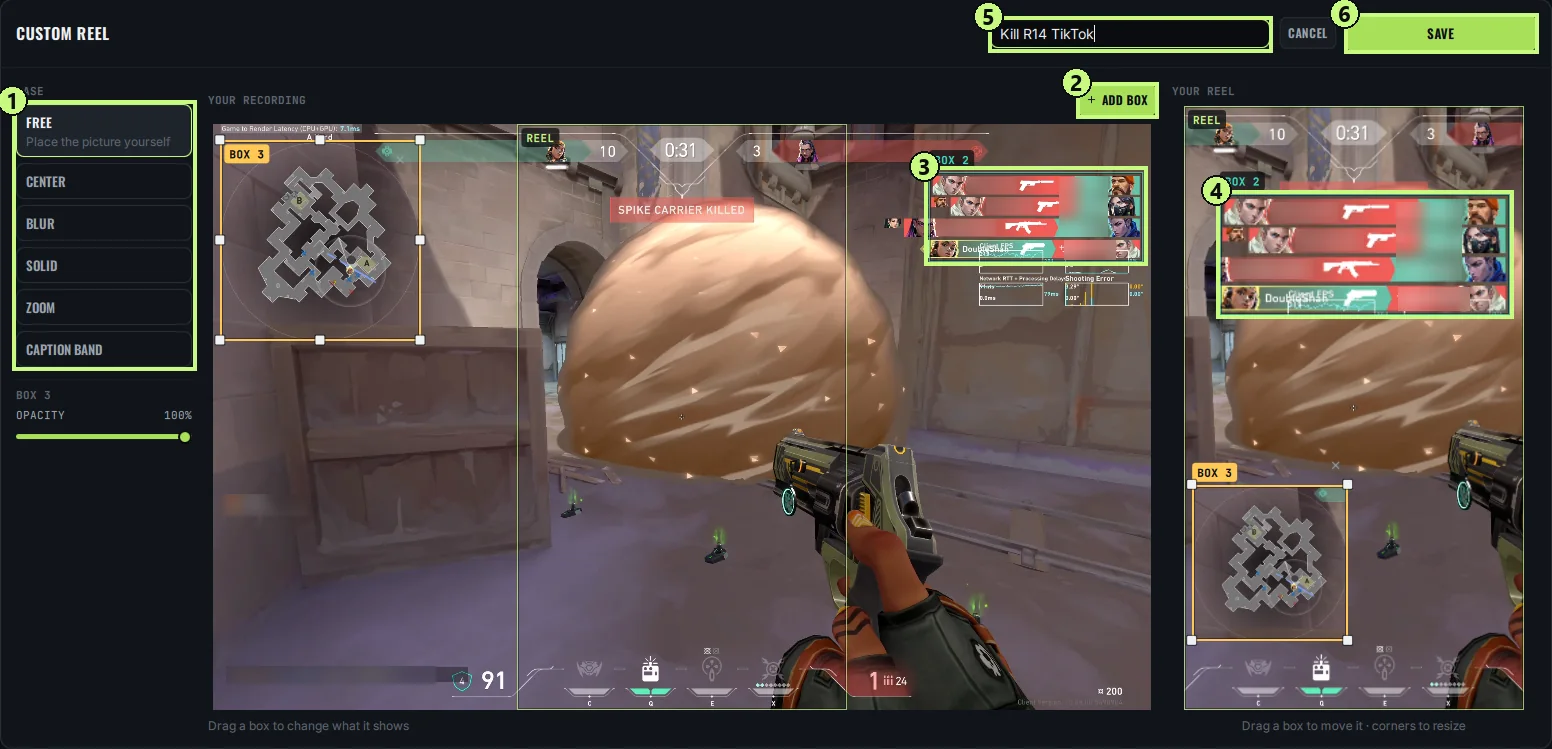
- Click REELS.
- Click CUSTOM REEL. The custom reel studio opens.
- Click a base (1). FREE shows a part of the game that you can move and resize. The other bases are the 9:16 layouts.
- Click ADD BOX (2). A box shows on the recording and on the reel.
- On the recording, drag the box onto the kill feed (3). Drag its handles until it shows all the kill feed.
- On the reel (4), drag the box to the position that you want. To make it larger, drag a corner.
- Do steps 4 to 6 again for the minimap.
- Type a name for the reel (5).
- Click SAVE (6). GLworm makes the reel.
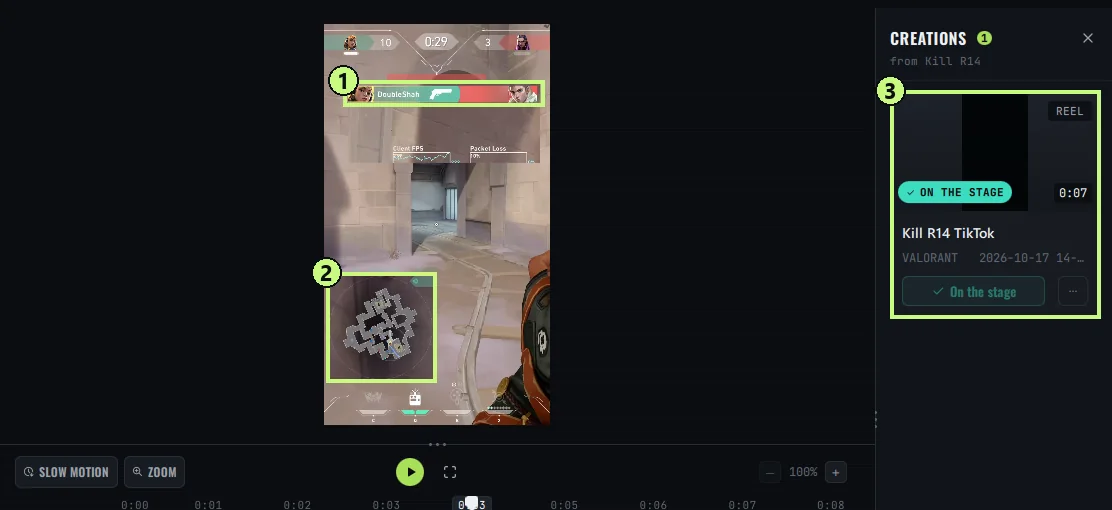
When the reel is complete, the Editor shows it. The reel is also in CREATIONS. See Figure 3.
You can add up to six boxes. To remove a box, click its ×. To make a box transparent, select it and move the OPACITY slider.
NOTE: You cannot change a custom reel after you save it. To change it, make a new custom reel.
3. Post the reel
The reel is on the Clips screen, in CREATIONS. To post it to TikTok, YouTube, Instagram, Facebook or Discord, see Post your clips from GLworm.
If you have a problem
| Problem | Do this |
|---|---|
| The custom reel studio is blurred and shows "Requires an active subscription". | Use the Blur layout, which is free. Or buy a plan on the Pricing page. If you bought a plan, click Already subscribed? Check again. |
| SAVE shows "Name already used". | Type a different name for the reel. |
| The kill feed is too small to read in the Blur reel. | Make a custom reel, and make the kill feed box larger on the reel. |
For more help, go to the Help Center.
More guides
- 06
Post your clips from GLworm
Connect your accounts and post a clip to YouTube, TikTok, Instagram, Facebook or Discord. Then look at the views.
- 01
Getting started with GLworm
Install GLworm, sign in, add your videos and make your first clip. Then find your clips.
- 02
Find your Valorant highlights automatically
Set your in-game name and select the moment types. GLworm then cuts a clip for each ace, headshot and knife kill.
- 03
Turn old Valorant recordings into highlight clips
Add the folder of your old recordings, set the game of each video and put the videos in the queue. GLworm cuts the clips.
- 04
Edit a clip and make a 9:16 reel
Add text, stickers and sound to a clip. Then make a 9:16 reel for Shorts, TikTok and Instagram Reels.
Your next highlight is already recorded.
Point GLworm at the recordings already on your drive. Every game edits free, and Valorant highlights get found for you.
- OS
- Windows 10 / 11, 64-bit
- Graphics
- DirectX 11
- Memory
- 4 GB
- Display
- 1400 × 720 or larger
A DirectX 12 GPU is optional, and it is what makes detection fast.